Understanding JavaScript Character Counting: Navigating Unicode Complexity
| Shelf | AI & ML |
|---|---|
| Date in | |
| Readers | 790 |
JavaScript character counting often misrepresents user-perceived characters due to Unicode complexities. Here's how to accurately count characters across various scenarios.
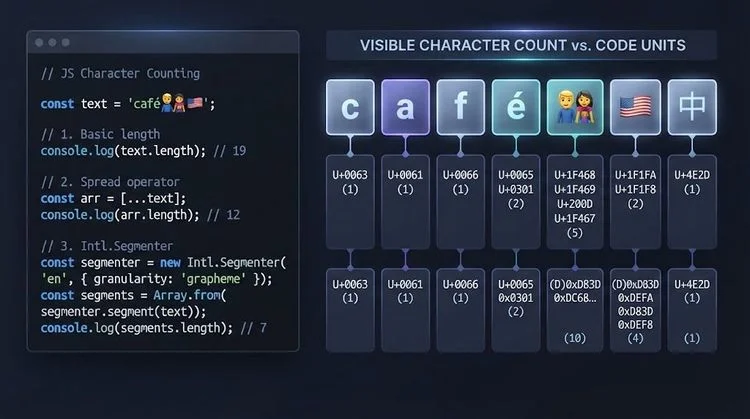
Understanding the complexities of character counting in JavaScript reveals how unicode intricacies can lead to misleading outputs when developers work with text input and manipulation.
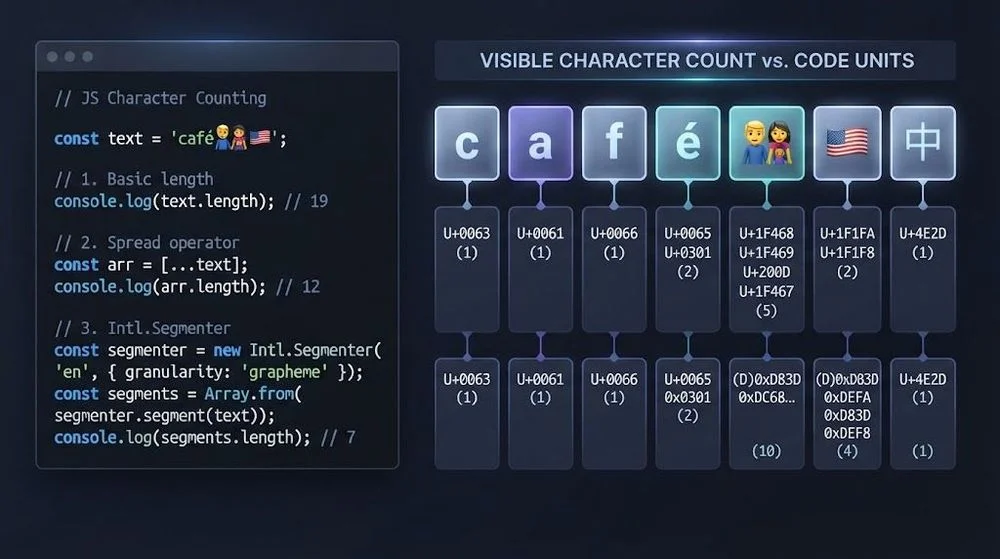
By Mohsin
When faced with implementing a JavaScript character counter, the task might seem deceptively simple, as a basic implementation can often be boiled down to a few lines of code:
const count = text.length;This approach will accurately count characters for basic ASCII or plain English text. However, the challenge arises when users input emojis, accented characters, flags, or even complex emoji combinations. When such characters enter the equation, the number presented by the character counter may not correlate with what users visually perceive on the screen.
This discrepancy stems from the fact that the term "character" encompasses multiple interpretations within JavaScript: UTF-16 code units, Unicode code points, and grapheme clusters (the user-visible characters). A misunderstanding here can lead to incorrect character counts, broken truncation, and inconsistent data validation.
This article aims to clarify how to accurately handle character counting in JavaScript and to discern which definition of "character" applies to your specific use case.
Why string.length Can Mislead You
Let's take a closer look at how the standard string length method operates:
const text = "hello";The output is:
console.log(text.length); // 5This seems flawless until we introduce an emoji:
const text = "😀";Here, the result changes unexpectedly:
console.log(text.length); // 2While the user sees only one emoji, JavaScript returns two due to the internal representation of characters. JavaScript strings are encoded in UTF-16, where certain Unicode characters require a combination of two 16-bit code units, known as surrogate pairs. Consequently, string.length accurately counts UTF-16 code units rather than counting visual characters or user-perceived count.
Three Different Things Developers Call a Character
To effectively handle text in JavaScript, it's vital to differentiate between these three units:
| Unit | JavaScript approach | What it measures |
|---|---|---|
| UTF-16 code units | text.length | JavaScript's internal string units |
| Unicode code points | [...text].length | Individual Unicode values |
| Grapheme clusters | Intl.Segmenter | User-perceived characters |
For typical ASCII or unaccented English, these counts may match. However, inconsistencies surface with the introduction of emojis, combining characters, or more complex scripts, often leading to miscalculations that can escape notice during initial testing.
A Better First Step: Iterate by Unicode Code Point
For a simple improvement, avoid using:
text.split("");and instead employ the spread operator:
[...text];For example:
const text = "😀";We can observe that:
console.log(text.split("").length); // 2console.log([...text].length); // 1This approach uses the string iterator to traverse Unicode code points instead of merely splitting UTF-16 code units. Alternatively, the Array.from() method achieves similar results:
const chars = Array.from(text);By implementing these approached iterative strategies, developers ensure they accurately handle text, particularly during character mapping or transformations.
Why One Visible Symbol Can Contain Several Code Points
Consider the complexity added by a family emoji:
const text = "👨👩👧👦";The display yields a single symbol; however, it represents multiple code points visually rendered as a single grapheme. Another example includes flags:
const text = "🇺🇸";This flag is composed of two regional indicator code points, again showing a single symbol to the user despite underlying complexity.
Furthermore, accented characters can exist in multiple valid representations:
const composed = "é";const decomposed = "e\u0301";Both versions appear identical but contain different underlying Unicode sequences. To account for normal user input, the grapheme cluster is generally preferred as the character unit—in essence, the character a user perceives, modifies, or edits as a single unit.
Count User-Perceived Characters with Intl.Segmenter
JavaScript now provides a native utility, Intl.Segmenter, for handling character segmentation accurately:
const segmenter = new Intl.Segmenter(undefined, {
  granularity: "grapheme"
});
The character counting function can then be devised as follows:
function countCharacters(text) {
  return [...segmenter.segment(text)].length;
}
This yields more user-relevant results:
console.log(countCharacters("hello")); // 5
console.log(countCharacters("😀")); // 1
console.log(countCharacters("🇺🇸")); // 1
console.log(countCharacters("👨👩👧👦")); // 1
By setting granularity to "grapheme," Intl.Segmenter accurately computes the number of characters as perceived by the user, instead of strictly counting code units.
A Practical Character-Counter Helper
To enhance maintainability and encapsulation, one recommended practice is to define segmentation logic within a reusable helper function:
const graphemeSegmenter = typeof Intl !== "undefined" && Intl.Segmenter
  ? new Intl.Segmenter(undefined, { granularity: "grapheme" })
  : null;

function getCharacterCount(text) {
  if (graphemeSegmenter) {
    return [...graphemeSegmenter.segment(text)].length;
  }
  return [...text].length;
}
This results in clearer UI code:
Character Limits Are a Product Rule, Not Just a JavaScript Rule
However, it isn't enough to merely count characters. The interpretation of a character limit varies significantly depending on its context. For instance, a character limit could denote any of the following:
- 20 UTF-16 code units
- 20 Unicode code points
- 20 grapheme clusters
- 20 bytes in a defined encoding
- Specific application rules defined by a database or API
The frontend interface should clarify how it counts user input, aligning it with the enforcement limit from the backend system. Character limit specifications must correspond to the corresponding character units to prevent confusion for the end-users.
Unicode Normalization Solves a Different Problem
Normalization resolves the issue of handling equivalent Unicode sequences:
const a = "é";
const b = "e\u0301";
console.log(a === b); // false
Though they visually appear identical, their different representations impact how they are processed programmatically. By applying:
console.log(a.normalize("NFC") === b.normalize("NFC")); // trueJavaScript provides String.prototype.normalize() that allows developers to choose between four normalization forms:
- NFC
- NFD
- NFKC
- NFKD
Choosing the right normalization form is essential, as combining distinct normalization techniques in the wrong context can obscure intended text representations. Thus, the developer should examine which equivalency needs to be maintained within the application.
Styled Unicode Is a Useful Frontend Stress Test
Testing with styled Unicode can expose vulnerabilities in handling diverse text input types. While working on applications that deal with multiple character types, developers can easily overlook specific edge cases unless they leverage varied test cases beyond standard ASCII. This means:
When you run tests like the following:
Hello worldYou'll likely find all expected behaviors align. But introducing a mix of symbols and emojis:
Hello 👨👩👧👦 🇺🇸 é नमस्तेCan quickly expose flaws in count or truncation logic that typically elude scrutiny in simpler scenarios. The principle here is straightforward:
Incorporate diverse test cases to challenge assumptions rather than relying solely on those that confirm desired outcomes.
Truncation Can Break for the Same Reason
It's also critical to note that truncation can compromise data integrity over unicode characters. Consider:
const shortened = text.slice(0, 10);Standard implementation merely slices UTF-16 code units. A better approach would be to segment first:
function truncateGraphemes(text, maxLength) {
  const segmenter = new Intl.Segmenter(undefined, { granularity: "grapheme" });
  return [...segmenter.segment(text)].slice(0, maxLength).map(item => item.segment).join("");
}
This ensures consistent handling of count and truncation regulations throughout.
A Compact Unicode Test Set for Frontend Text Handling
A small compact Unicode test set can expose most Unicode mistakes rather effectively:
const cases = [
"Hello",
"café",
"é",
"😀",
"👍🏽",
"🇺🇸",
"👨👩👧👦",
"नमस्ते"
];These can be utilized to verify any functionalities that involve:
- Character counting
- Length restrictions
- Truncating strings
- Transforming or normalizing text
- Copying to a clipboard
- Generating usernames
- Rendering live previews
- Transmitting data to APIs
Leveraging a small but diverse test set lets developers catch significant Unicode-specific issues without needing extensive repetitions of ordinary tests.
Common JavaScript Unicode Mistakes to Avoid
- Using
split("")for character iteration: This method merely splits UTF-16 code units, risking character data integrity. - Assuming
[...text]solves every unicode issue: While it counts code points, it may not represent grapheme clusters accurately. - Utilizing
string.lengthas a user-facing count: The method itself is correct, but its application may mislead. - Normalizing everything: This can confuse characters that were specifically chosen based on appearance.
- Testing only ASCII or English: Most bugs remain hidden until non-typical characters or symbols unite.
- Counting and truncating with differing units: Consistency in segmentation rules is essential.
- Treating visual equality as string equality: Two visually identical strings can possess different Unicode sequences.
FAQ
Is JavaScript string.length wrong?
No, it gives an accurate count of UTF-16 code units. The product becomes misleading only when misinterpreted as the count of visible characters.
How Do I Count Emoji as One Character in JavaScript?
The best practice involves utilizing Intl.Segmenter with:
granularity: "grapheme"Allowing for nuanced handling of complex emoji sequences and character clusters.
Is [...text].length Unicode-Safe?
Yes, as it operates on Unicode code points rather than UTF-16 units, offering an improved accuracy level.
Should I Use Intl.Segmenter for Every Text Limit?
This isn't universally necessary; apply it when character limits correspond to user-perceived characters.
Should I Normalize Text Before Counting It?
Only if there's a specific reason to treat similar Unicode sequences equivalently.
Why Can the Same Unicode Text Look Different Across Browsers or Devices?
Unicode defines the characters, while glyph rendering can vary dramatically due to font and system design.
The Real Bug Is Usually the Assumption
The peril often lies not in the implementation itself but the assumptions harbored in what constitutes a "character." If the intent is to quantify user-perceived text, grapheme clusters generally offer the closest frictionless match.
Before pushing your character count utility live, conducting tests with flags, emoji sequences, combining accents, joined family emojis, and non-Latin scripts ensures that the essential components of character counting are firmly established.
Only then will you be confident that your character counter accurately measures the intended values, safeguarding against potential pitfalls.
Author Bio
Mohsin is an SEO strategist and web publisher intrigued by Unicode text handling, frontend performance, and cross-platform content behavior.