Enhancing 3D Printing Efficiency with the Gridfinity Drawer Configurator
| Shelf | Security |
|---|---|
| Date in | |
| Readers | 358 |
Discover the capabilities of the Gridfinity Drawer Configurator, a parametric tool for personalized drawer layouts that optimize 3D printing processes.

For those looking to maximize their workspace organization through innovative solutions, the Gridfinity Drawer Configurator presents compelling new features that cater specifically to the needs of both hobbyists and professionals in 3D printing. This parametric tool elevates drawer configuration by allowing users to create tailored layouts that perfectly fit their drawer dimensions, providing a seamless way to optimize storage using specially designed bins.
What's New in the Gridfinity System?
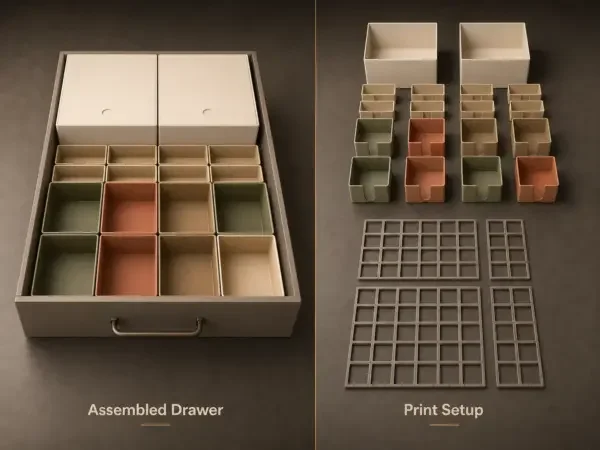
The Gridfinity Drawer Configurator, shared by 3D printing enthusiast JeanBeraud, introduces a range of customizable options that extend beyond standard storage solutions. Users can enter their specific drawer dimensions and select from various preset layouts, which significantly reduces the time spent on planning and measuring while ensuring an organized space.
One of the notable advancements in this version is the introduction of optional features such as bins with lids, pull holes, and magnet holes. This allows for more versatile storage options tailored to different user preferences and requirements. For example, the choice to include pull holes makes accessing stored items easier, while magnet holes can help integrate the bins into a broader magnetic storage system.
Parametric Design Meets 3D Printing
This configurator utilizes a parametric design approach, meaning that each adjustment to the drawer’s dimensions or the layout of the bins is instantly reflected in the design generated. This adaptability is vital for users working with different drawer sizes or those wishing to create bespoke storage solutions. By automatically splitting larger layouts based on printer size, the tool ensures that users can utilize standard printers without needing extensive modifications or workarounds.
Users can experiment with a mix of various bins, including small, large, low, and tall configurations. This flexibility supports various storage needs within a single setup, thus enhancing not only personalization but also efficiency in 3D printing. The configurator provides an exploded view and a preview of the fully assembled layout, enabling users to visualize their design before starting the printing process.
Optimal Printing Experience
The configurator also includes printer presets and test modes, which streamline the preparation for printing. With print times ranging from 46 minutes to over 8 hours, depending on the selected profile, users can choose designs that suit both their time constraints and material capabilities. Such detailed configurability promotes a tailored manufacturing experience, enhancing the practical applicability of the designs produced.
JeanBeraud has documented 82 reviews of the configurator, which show a positive reception among early adopters. The feedback highlights that these tools empower even novice users to achieve professional results, supporting a broader range of 3D printing applications. Within the 3D printing community, this tool offers renewed enthusiasm, steering creators toward productive and creative uses of their machines.
Manual Resources and Community Engagement
For those eager to dive deeper into the configurator's capabilities, a detailed manual (TUDC manual V1.1.1.pdf) is available under the Files & Guides section of the configurator page. Such comprehensive resources are essential for users to navigate the potential intricacies of the software and fully leverage its functionalities.
As part of ongoing engagement in the 3D printing community, Adafruit holds a #3DThursday event that highlights exciting projects and innovations like the Gridfinity Drawer Configurator. This weekly celebration emphasizes the hard work and creativity driving the 3D printing field, encouraging users to share their own projects and successes.
What to Watch Next
While the Gridfinity Drawer Configurator provides a solid foundation for personalized storage solutions, it will be interesting to observe how this tool evolves in future versions. Potential enhancements could include additional customization features, integration with other software platforms, or further simplifications of the design process. Open questions about compatibility with various 3D printers and materials remain, leaving users keen to explore future updates that may address these concerns.
In conclusion, the Gridfinity Drawer Configurator offers an engaging, user-friendly approach for maximizing drawer organization through precise, customizable designs catered specifically to 3D printing. With its emphasis on practical applications and efficiency, it stands to benefit both seasoned makers and those new to the 3D printing landscape. For additional resources and to explore the configurator firsthand, visit the Gridfinity Drawer Configurator page.