Understanding Autoscaling Challenges in Docker Swarm and Azure VMSS
| Shelf | AI & ML |
|---|---|
| Date in | |
| Readers | 774 |
Exploring the mismatch between Docker Swarm's scheduling and Azure's autoscaling reveals significant insights into optimizing resource management in cloud environments.
TL;DR — Key Takeaways

- A successfully triggered CPU scale-out showed that the Azure VMSS path worked as expected, but downsizing workers revealed a scheduling capacity issue even when the infrastructure metrics seemed healthy.
- Resource reservations dictate capacity that the scheduler must commit rather than actual runtime consumption, creating a discrepancy between Azure Monitor and Docker Swarm responses.
- An effective autoscaling design must evaluate scheduler pressure directly alongside infrastructure metrics to accurately signal when resources cannot be allocated.
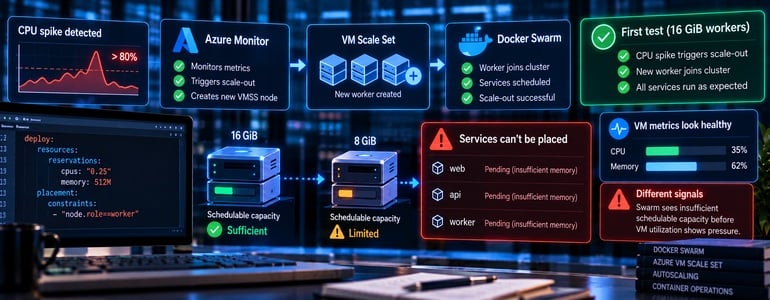
During an initial autoscaling test, the design leveraged Azure’s Virtual Machine Scale Set (VMSS) to observe how Docker Swarm managed worker nodes amid changing workloads. Initially, when a CPU spike was detected, a new worker was spun up and successfully integrated into the cluster, confirming that the scale-out mechanisms functioned properly.
However, this success was contrasted sharply when we revised the worker specifications. Reducing the worker size from 16 GiB to 8 GiB while maintaining service reservations resulted in several services being unable to run. Intriguingly, while Docker Swarm encountered a scheduling bottleneck, Azure’s autoscaling system did not perceive any immediate resource shortages based on the VM metrics.
The First Test Validated the Scaling Mechanism
The autoscaling strategy was built around CPU utilization metrics enhanced with memory and queue length signals. A deliberate cooldown period was integrated to mitigate flapping during adjustments. The CPU rule specified that when average utilization exceeded 80% over a ten-minute window, an additional worker would be added, demonstrating an effective end-to-end scaling response.
az monitor autoscale rule create \
   --resource-group <resource-group> \
   --autoscale-name swarm-autoscale \
   --condition “Percentage CPU > 80 avg 10m” \
   --scale out 1 \
   --cooldown 5
Downsizing Exposed a Different Limitation
Changing the worker specifications to the smaller 8 GiB nodes proved problematic. Even though Azure Monitor continued to show acceptable host-level memory utilization, Docker Swarm's scheduler started encountering capacity issues. Certain services could not launch due to their memory reservations not being met, highlighting a critical disconnect in how each system interpreted capacity.

For instance, within the deployment configuration, memory reservations indicated to Swarm how much memory was necessary for task placement:
deploy:
  resources:
    reservations:
      cpus: “0.25”
      memory: 512M
    placement:
      constraints:
        - "node.role==worker"
Understanding Reserved Capacity
Reservations, as defined in the configuration, signal the scheduler about required memory availability rather than actual memory in use. Thus, while Azure observed acceptable utilization levels on the virtual machines, Docker Swarm awaited memory that met the declared reservations. This divergence means that while Azure's autoscaling may see healthy conditions, the scheduling pressure on Swarm could result in tasks left pending.
Identifying Diagnostic Signals
When discrepancies arise, relying solely on host CPU or memory metrics is insufficient. An effective diagnosis involves inspecting task states and understanding pending reasons. Executing a minimal diagnostic check such as:
docker service ls

docker service ps <service> –no-trunc

docker node inspect –pretty <node>
is crucial for determining if the unscheduled task is due to insufficient runtime memory or unmet reservation constraints. Each scenario demands distinct scaling responses.
Our controlled tests where we removed reservations on smaller workers confirmed that reservation constraints were impacting service placement. However, bypassing those reservations isn't a viable production strategy, as they are critical for ensuring the scheduler isn’t overcommitting resources expected by workloads.
Refining Autoscaling Validation Approaches
With lessons learned, my approach to testing autoscaling underwent substantial changes. Instead of relying solely on successful CPU scale-out results, I now conduct assessments focusing on four key areas:
- Confirming that all required tasks can be scheduled at the minimal worker count.
- Investigating the effect on schedulable capacity when worker sizes are altered.
- Identifying the specific metric that prompts infrastructure scale-outs.
- Ensuring that the identified metric reacts promptly to avoid pending tasks at the scheduler.
This refinement emphasizes that autoscaling policies and scheduling strategies should be developed in tandem. If the infrastructure does not recognize the scheduling pressures faced by the orchestrator, merely adding autoscaling rules based on host metrics will not resolve the underlying issues.
Ultimately, the more valuable autoscaling signal often arises from determining when the scheduler is unable to place tasks, rather than just monitoring when the virtual machine is under load. Addressing this nuanced perspective will lead to more robust management of resources within container orchestration frameworks.