Harnessing Semantic HTML for Enhanced Web Accessibility and Maintenance
| Shelf | AI & ML |
|---|---|
| Date in | |
| Readers | 488 |
Employing semantic HTML elevates web development by optimizing accessibility, structure, and maintainability while minimizing reliance on JavaScript.
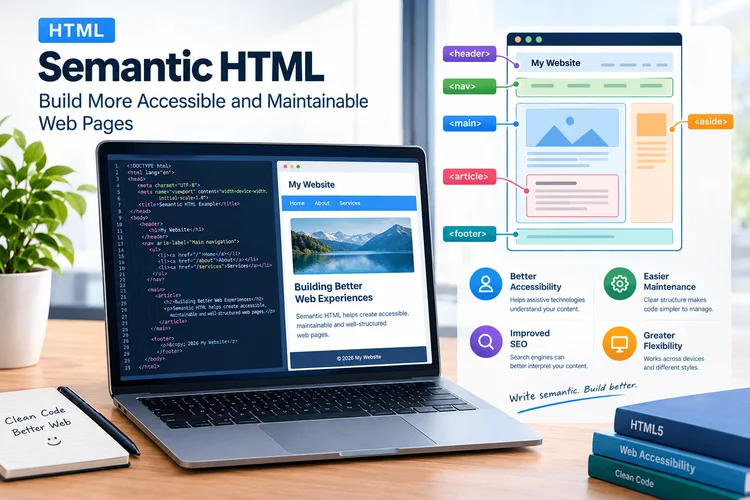
HTML is more than a mere tool for designing web pages; it serves as the backbone of online content. With the increasing focus on accessibility, maintainability, and seamless browser behavior, developers must adopt a nuanced approach when structuring their HTML. By utilizing semantic HTML—elements that convey meaning—developers can significantly enhance their web projects while simplifying the code base.
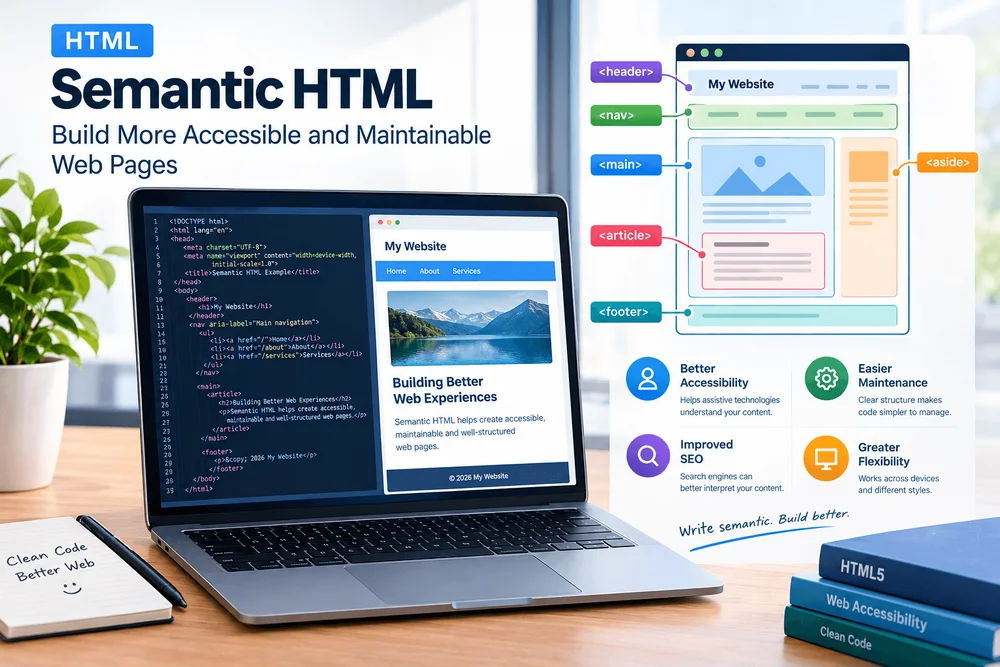
This article explores the significance of semantic HTML and offers actionable strategies for implementing it effectively in real-world applications.
What Is Semantic HTML?
Semantic HTML refers to the practice of using HTML elements that accurately reflect the content they encapsulate. For instance, the <nav> tag specifically indicates a navigation section, while <main> designates the primary content area. These elements are crucial because they impart meaning not only to browsers but also to assistive technologies and fellow developers.
A typical error occurs when developers rely on generic <div> elements to create a navigation structure. Take this example:
<div class="navigation">
  <div class="navigation-item"><a href="/about">About</a></div>
  <div class="navigation-item"><a href="/services">Services</a></div>
</div>
Though functional, this code fails to clearly identify its purpose. In contrast, using <nav> enhances clarity:
<nav aria-label="Main navigation">
  <ul>
    <li><a href="/about">About</a></li>
    <li><a href="/services">Services</a></li>
  </ul>
</nav>
This semantic approach greatly benefits accessibility tools like screen readers while delivering a clear hierarchy for developers reviewing the code. Although utilizing semantic HTML does not guarantee complete accessibility, it creates a more solid foundation.
Structure Pages With Meaningful Elements
Organizing content with appropriate HTML elements leads to a cleaner and more intuitive structure. Important semantic elements include:
<header>for introducing content.<nav>for navigation links.<main>for main content.<section>for grouping related content.<article>for self-contained content items.<aside>for supplementary information.<footer>for footer content.
The emphasis should be on purpose over appearance. For example, a blog's structure might look like this:
<body>
<header><a href="/">Developer Journal</a></header>
<nav aria-label="Main navigation">
<a href="/articles">Articles</a>
<a href="/tutorials">Tutorials</a>
</nav>
<main>
<article><h1>Understanding Semantic HTML</h1><p>Semantic elements make document structure easier to understand.</p></article>
</main>
<footer>© 2026 Developer Journal</footer>
</body>
This structure enables CSS to dictate the visual layout, making it vital to separate content from design.
Improve Accessibility With Native HTML
Leveraging native HTML elements simplifies implementing accessibility features. For example, using a <button> instead of a styled <div> guarantees built-in keyboard functionality and semantics:
<button type="button" id="show-details">Show details</button>When building forms, associating <label>s with their respective input fields speeds up user interactions:
<form action="/subscribe" method="post">
  <label for="email">Email address</label>
  <input type="email" id="email" required>
  <button type="submit">Subscribe</button>
</form>
Accessibility should be integrated from the development stage, including logical heading hierarchies, meaningful image descriptions, and keyboard navigation support.
Keep HTML Separate From Presentation
HTML should define a document's structure while CSS should manage its styling. Mixing these can complicate the code. For instance, using inline styles like:
<p><font color="blue">Important information</font></p>is suboptimal compared to using classes managed by CSS:
<p class="notice">Important information</p>.notice { color: #174ea6; font-weight: 600; }This approach maintains design flexibility while adhering to semantic principles.
Use Native Elements Before Adding JavaScript
Developers often introduce JavaScript for interactive features that native HTML elements can handle. For example, the <details> and <summary> elements provide built-in mechanisms for expanding and collapsing content without extra code:
<details><summary>How does semantic HTML help?</summary>It communicates the purpose of content.</details>Native solutions minimize potential bugs and enhance performance. While some components may still require extra JavaScript, start with native elements to simplify development.
Validate and Test Your Markup
Validation is key to ensure that HTML codes function correctly across different browsers. Use services like W3C Markup Validation Service to identify errors. Effective testing incorporates:
- Keyboard navigation checks for interactiveness.
- Heading structures that reflect content hierarchy.
- Validation functionalities for form inputs.
- Responsive layout assessment across screen sizes.
- Usability tests with assistive technology.
Automation tools are helpful but cannot replace the need for rigorous manual testing to identify and resolve usability challenges.
Avoid Common Semantic HTML Mistakes
Mistakes often occur, such as overusing <section> as generic containers without thematic relevance or misusing elements based solely on their presentation rather than their purpose. ARIA attributes, while useful, should not substitute for native semantics. Developers must embrace best practices without complicating their structures unnecessarily.
Conclusion
Investing in semantic HTML is vital for ensuring lasting website quality. Adopting meaningful elements strengthens document architecture, enhances the experience for assistive technologies, and simplifies maintenance for developers. The approach is clear: utilize HTML according to its intended purpose, separate content from design, minimize unnecessary scripts, and prioritize user-testing to build efficient interfaces.
These practices lead to clearer, more maintainable, and accessible web applications without the need for complex frameworks.