Mastering Progressive Enhancement for Better Web Experiences
| Shelf | AI & ML |
|---|---|
| Date in | |
| Readers | 986 |
Implementing progressive enhancement allows websites to function smoothly even without JavaScript, ensuring a more resilient user experience.
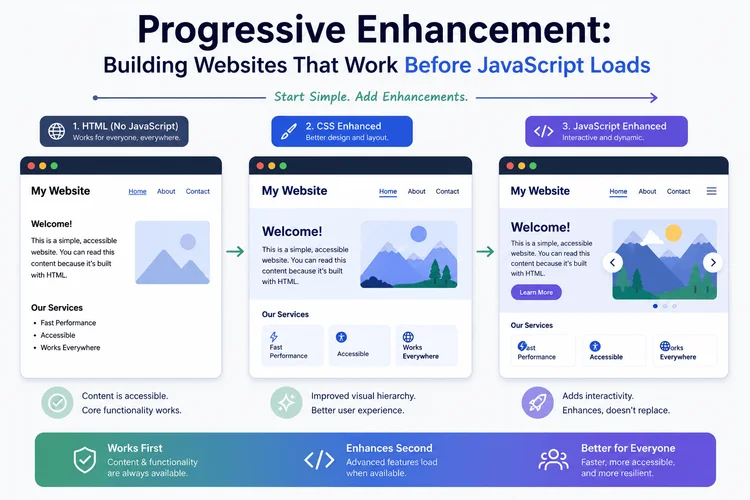
JavaScript has become the backbone of modern web interfaces, powering features like interactive menus, dynamic forms, and real-time dashboards. However, if a website relies solely on JavaScript, it risks losing functionality when faced with slow connections, script errors, or browser incompatibilities, leading to frustrating user experiences. That's where progressive enhancement comes into play, offering a strategy for developers to build websites that are inherently functional, providing a solid experience regardless of JavaScript availability.
Understanding Progressive Enhancement
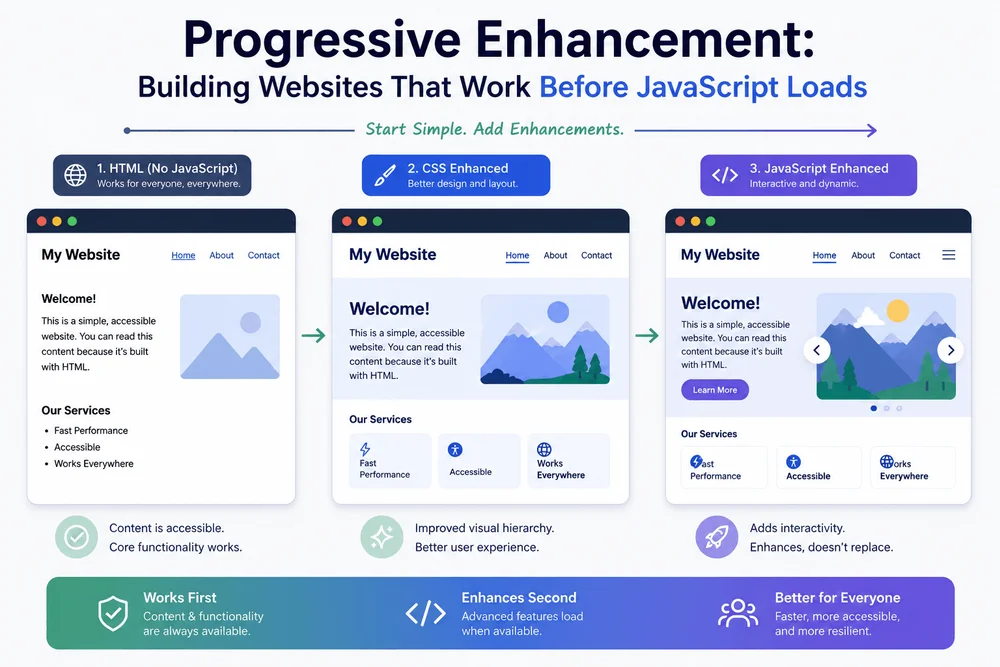
At its core, progressive enhancement is a web development strategy that builds user experiences on a foundation of essential functionality. This approach is structured around three fundamental layers:
- HTML provides the structure and core functionality. It defines the primary elements users interact with, such as links, forms, and headings.
- CSS enhances the presentation. It allows developers to improve the layout, typography, and style of the elements defined in HTML.
- JavaScript adds interactivity. JavaScript can introduce dynamic behavior like live search suggestions but should not be the sole method of accomplishing basic tasks.
This layered approach emphasizes creating a usable site first—one that serves its fundamental purpose without requiring advanced client-side scripts. For instance, a product listing page should allow users to navigate products and view details even if animations fail to load. The key is ensuring that core features work in less-than-ideal situations, providing users with essential access.
Starting with Functional HTML
Every website should begin with a solid HTML foundation. Consider the example of a search form:
<form action="/search" method="get">
  <label for="search-query">Search articles</label>
  <input type="search" id="search-query" name="q" required>
  <button type="submit">Search</button>
</form>
This example leverages standard HTML features, allowing the browser to send a GET request to the server, ensuring that even without JavaScript, users can search effectively. The server must then provide appropriate responses based on the request.
Improving the Experience with CSS
Once the HTML is in place, CSS can enhance the user experience significantly:
form {
  display: grid;
  gap: 0.75rem;
  max-width: 32rem;
  margin-inline: auto;
  padding: 1rem;
}

label {
  font-weight: 600;
}

input {
  width: 100%;
  box-sizing: border-box;
  padding: 0.75rem;
  border: 1px solid #767676;
  border-radius: 0.375rem;
  font: inherit;
}

button {
  justify-self: start;
  padding: 0.75rem 1rem;
  border: none;
  border-radius: 0.375rem;
  background: #174ea6;
  color: white;
  font: inherit;
  cursor: pointer;
}
This CSS improves aesthetics and usability—spatial organization, readability, and responsive design—while maintaining a clear structure that works even without enhancements. It's essential to ensure flexibility for mobile users as well.
Enhancing with JavaScript
With a functional HTML structure in place, JavaScript can now be added to enrich the user experience without making it a prerequisite. A practical example is implementing a character counter for the search input:
const searchInput = document.querySelector("#search-query");
const characterCount = document.querySelector("#character-count");

if (searchInput && characterCount) {
  characterCount.hidden = false;

  function updateCharacterCount() {
    const count = searchInput.value.length;
    characterCount.textContent = `${count} characters entered`;
  }

  searchInput.addEventListener("input", updateCharacterCount);
  updateCharacterCount();
}
This script enhances the interaction by providing real-time feedback without hindering the primary function of the search form. If JavaScript fails to load, the basic function remains intact.
Incorporating Accessibility
Progressive enhancement aligns closely with accessibility principles. Native HTML elements possess inherent behaviors that are crucial for usability. For example, a semantic button automatically allows keyboard activation:
<button type="submit">Search</button>
In comparison, elements styled as buttons lack this functionality unless additional scripts are provided. Ensuring that similar accessibility features inform users about errors and validations is essential; important requirements should be clear without relying solely on client-side checks.
Carefully Managing JavaScript Dependent Features
Developers should be mindful of features that inherently require JavaScript, such as interactive charts or complex map interfaces. The goal is not to avoid JavaScript altogether but to maintain access to core content. For instance, a page with a JavaScript-dependent chart should still display relevant data in a table format.
Additionally, ensuring users have alternate ways to access information, like providing static addresses instead of only interactive maps, is vital for usability when features fail to load.
Testing the Experience Without JavaScript
Verifying that a site functions as intended without JavaScript is critical. Start by identifying key functionalities, such as submitting a form, and test the following:
- Disable JavaScript, reload the page, and ensure core components work.
- Submit forms and verify the server returns accurate results.
- Check navigation and usability without a mouse.
- Examine mobile responsiveness.
- Simulate different network conditions to ensure content loads appropriately.
This rigorous testing ensures that your site is not only operable but accessible and intuitive as well.
Identifying When Progressive Enhancement is Most Valuable
This approach is particularly beneficial for content-rich sites, such as documentation hubs, search engines, and product pages, where reliable access is paramount across varying devices and conditions. For complex applications, developers must plan how to delineate essential functionalities from optional enhancements, reinforcing proper user experience regardless of the available features.
Conclusion
Adopting a progressive enhancement strategy fosters robust web solutions that can adapt to diverse user environments. By prioritizing foundational functionality through well-structured HTML, enhancing aesthetics with CSS, and selectively employing JavaScript, developers can provide far-reaching experiences that remain accessible even when scripts fail.
Instead of making every aspect of a website reliant on JavaScript, ask: what essential actions should users retain even if enhancements are unavailable? This mindset enables cleaner interfaces and improved long-term maintainability of web applications.