Containerizing Claude Code: Securing AI Agents with Docker
| Shelf | AI & ML |
|---|---|
| Date in | |
| Readers | 813 |
Containerization enhances security for AI coding agents like Claude Code, providing boundaries that mitigate risks and streamline development processes.
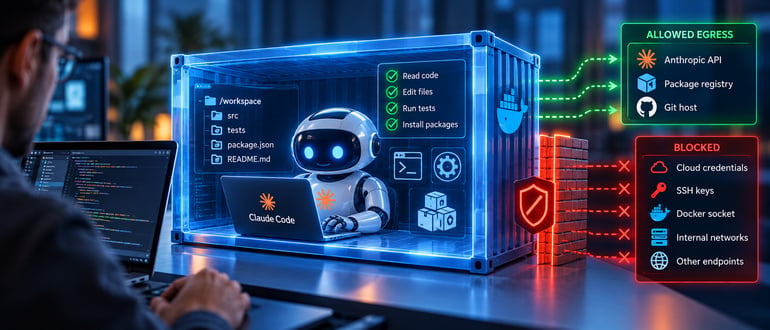
As the capabilities of AI coding agents grow, teams face increasing security concerns. Tools such as Claude Code go beyond mere autocomplete; they engage actively with project repositories, executing commands, installing packages, and modifying files with minimal human oversight. This level of access mirrors that of a user, giving these agents potential access to sensitive configurations and credentials stored on local machines. Implementing containers can significantly enhance the safety of these interactions by establishing boundaries for what an agent can access and execute.

Understanding Permission Fatigue
A key security risk stems from “permission fatigue.” Engineers often find themselves inundated with approval prompts as an agent requests access to various components of their environment. Over time, these repetitive confirmations can become reflexive, leading to dangerous oversights and granting extensive privileges. Utilizing containers reduces reliance on such manual approvals by defining permissions within a comprehensive, reviewed file that standardizes what the agent can access.
Requirements and Limitations of AI Agents
Every AI agent requires a specific set of resources to perform its tasks effectively. This includes access to project source files, programming tools, package registries, version control systems, and endpoints for model inference. However, typical developer machines often provide far more access than necessary, including long-lived tokens, SSH keys, or Docker socket access.
This expansive access poses risks, particularly if an agent misreads commands or acts on malicious code embedded in dependencies. The solution lies in containerization, effectively narrowing down the gap between what an agent needs and what it can access.
Steps to Containerize the AI Agent
Containerization involves multiple strategic decisions to ensure effective containment and security:
1. Building the Container Image
Start with a minimalist container image. Use a specific version of the language toolchain and disable self-updates to ensure consistent behavior across environments. For example:

FROM node:22-bookworm-slim
RUN apt-get update && apt-get install -y --no-install-recommends git ripgrep ca-certificates
RUN npm install -g @anthropic-ai/claude-code@${CLAUDE_CODE_VERSION}
It’s crucial to pin the toolchain and run the container as a non-root user to mitigate risks associated with elevated privileges.
2. Managing Mounts
To maintain security, mount only the required project directory. Avoid accessing sensitive files by using named volumes for the agent’s configurations. For instance:
docker run --rm -it \
  --cap-drop ALL --security-opt no-new-privileges \
  --network agent-internal \
  -v "$PWD":/workspace \
  -v claude-config:/home/node/.claude agent-box claude
This setup ensures that the container accesses only what is necessary for the task at hand and prevents harmful access to host configurations.
3. Credential Management
When passing credentials to the container, opt for scoped API keys or short-lived tokens instead of personal credentials. This reduces the risk of exposure should the agent act in an unexpected manner.
4. Handling Outbound Traffic
Limit outbound network traffic to essential endpoints, blocking all others. Implement firewall rules either with iptables or by leveraging a curated Docker network that enforces strict allowlists. This measure prevents unverified data from leaving the container.
Benefits of Containerization
Implementing containers offers several advantages:
Bounded Failure
Should the AI agent execute an incorrect command, the impact is confined to the local project directory and the previously defined access points, minimizing potential damage.
Efficient Unattended Operations
Containerization also allows for unattended runs without the constant pop-up of approval prompts, as long as operations are conducted within a trusted boundary.
Reproducible Environments
By standardizing images, development environments become reproducible, simplifying onboarding for new engineers and ensuring consistency across team members’ setups.
What Containerization Does Not Address
While containers enhance security, they are not foolproof. Risks still exist:
- Exfiltration threats remain if the agent can read sensitive tokens and access allowed external locations.
- Changes made within the shared workspace can affect the host, especially files in version control systems.
- Containers still share the host kernel. For untrusted repositories, consider utilizing more isolated environments such as virtual machines or microVMs.
- Repository policies can still be altered by users with write access, thus requiring diligent oversight.
- Data disclosed to the inference provider remains a concern, as isolation limits reach but not exposure.
Conclusion
Employing containers for AI coding agents like Claude Code is a valuable strategy for enhancing security and managing access. By clearly documenting what the agent needs to operate, teams can effectively leverage the inherent advantages of containerization, fostering a more controlled development environment. However, it is essential to remain mindful of underlying risks and actively manage the security policies governing both the container and the access points.