Implementing Headless WordPress on Kubernetes: Advantages and Considerations
| Shelf | AI & ML |
|---|---|
| Date in | |
| Readers | 846 |
Explore the benefits and complexities of deploying headless WordPress on Kubernetes, revealing how it enhances scalability and integration in cloud environments.
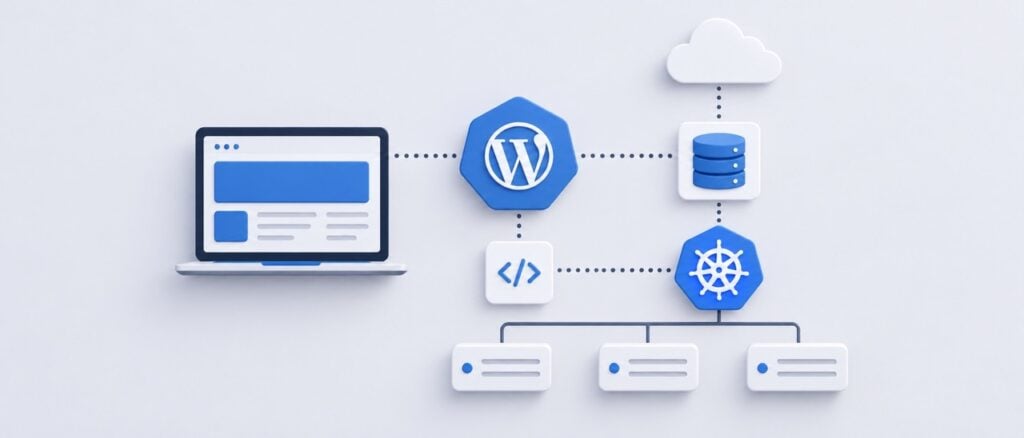
While WordPress traditionally operates on standard web servers, integrating it with Kubernetes through a headless architecture shifts that paradigm significantly. By focusing on content management and API delivery, organizations can separate the frontend experience from the backend, deploying each component more flexibly within Kubernetes' containerized environment. This setup allows for distinct scaling of the frontend and backend services, which is particularly beneficial for teams operating in cloud environments.

Why Choose Headless WordPress on Kubernetes?
Using Kubernetes isn’t necessary for every WordPress installation. Standard WordPress sites function well on conventional hosting solutions, making Kubernetes' overhead sometimes pointless for smaller or less-traffic-intensive sites. However, when traffic is variable, or when WordPress is part of a broader microservices architecture, the justification for deploying it on Kubernetes becomes stronger. A headless configuration often involves WordPress managing content offered by REST or GraphQL APIs, complemented by frontend technologies such as React or Next.js for user experiences. By leveraging Kubernetes, teams can maintain a unified deployment environment where individual services can be scaled based on need rather than scaling the entire platform.
Decoupling Frontend and Backend
A clear architectural split is essential in the headless approach. WordPress functions primarily as an editorial platform, with content creators using its familiar dashboard to manage and publish content. Instead of rendering pages directly, the frontend pulls structured data via APIs, allowing for a freely chosen technology stack that aligns with project demands. This separation elevates the value of headless architecture while ensuring that the frontend doesn't fall back into dependencies typically seen with traditional WordPress themes.
Managing WordPress Containers
Effective use of Kubernetes emphasizes disposable containers. Traditional WordPress setups often depend on local files for plugins, themes, and media uploads, creating potential issues when containers are terminated and recreated. In a Kubernetes environment, it’s essential to engineer around this; application code should reside within the deployment pipeline, while media files can be stored in object storage systems. Databases must also be situated outside of temporary containers to ensure persistence, typically using managed database solutions optimized for such workloads.
Database Considerations
Scaling WordPress instances horizontally is relatively straightforward. The challenge arises when scaling the database, as multiple replicas rely on shared data. Utilizing a managed MySQL-compatible service often proves to be more effective than hosting a database within the Kubernetes cluster itself. This strategy also simplifies backup, replication, and performance monitoring, avoiding the complications and workload associated with managing a database directly inside Kubernetes.
Handling Media Uploads
Media uploads pose another challenge in a headless setup. If media files are stored locally within a particular WordPress pod, other replicas will not have access to these files, leading to potential disruptions. Implementing an object storage solution enables WordPress to send media uploads to an external service, while the CDN (Content Delivery Network) can efficiently serve these media files to users. Alternatively, Kubernetes persistent volumes can be utilized, although the choice largely depends on project needs and infrastructure capabilities.
Implementing Caching Strategies
When deploying a headless WordPress, multiple layers of caching are introduced. WordPress can leverage object caching to mitigate repetitive database queries, while API responses can be cached to optimize performance. The frontend framework may generate or revalidate pages in advance, and public assets can be cached closer to users through a CDN. Striking the right caching balance is crucial; too aggressive caching could result in stale content, while insufficient caching could burden WordPress and the database with excessive requests.
Optimizing Autoscaling
Kubernetes offers the ability to autoscale, but simply enabling this feature without effective metrics can lead to inefficiencies. Traditionally used signals such as CPU utilization may not fully reflect the workload. Instead, examining metrics like memory usage, request rates, or latency can provide insight into when scaling is genuinely required. It’s vital to address application inefficiencies that could overload the database when more replicas are added; thorough performance testing should guide setting autoscaling parameters.
Deployment Strategies
Containers lend themselves to predictable deployments, making processes smoother as the same version is promoted across development, staging, and production. However, WordPress introduces complexity, as content editors expect the CMS to remain operational during updates. Implementing rolling updates ensures that the service remains available while transitions occur, though any changes to the database structure must be handled delicately to accommodate both new and legacy application instances.
Monitoring Performance Across the Stack
In a headless setup, slow requests might stem from various components in the architecture including the frontend, API, WordPress application, or database, making holistic monitoring crucial. Utilizing centralized logging and robust metrics will help track response times and error rates, rather than merely ensuring that Kubernetes pods are alive. A functional pod may still exhibit poor performance if any part of the request path encounters delays.
The Real Value of Kubernetes for WordPress
Executing a headless WordPress architecture does not inherently necessitate Kubernetes, and adding Kubernetes does not automatically enhance performance. The value manifests when independent services, autoscaling, high availability, and consistency across cloud infrastructure are genuinely needed. For organizations with complex requirements or higher traffic, this infrastructure can facilitate the scaling of WordPress as a dedicated content service, thereby embracing a more modern application delivery method, while maintaining the familiar editorial experience.